Home Forums Printing Discussions Roland Printers Versaworks Update problems

  • Versaworks Update problems

    Posted by David Hammond on 4 October 2011 at 12:10

    My versaworks checks for updates on each startup, and today I finally gave way and clicked update.

    I was already on V4 with no problems… this update buggered up a morning for me.

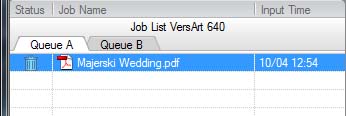
    It installs, I open up VW, to discover all my existing jobs I cannot open, and just have the waste basket logo next to them. Even now when ever I close VW and re-launch all the jobs are useless and just have a waste bin next to them… even though the settings are set to save.

    No problem, as I delete all my jobs every month and they were all from september.

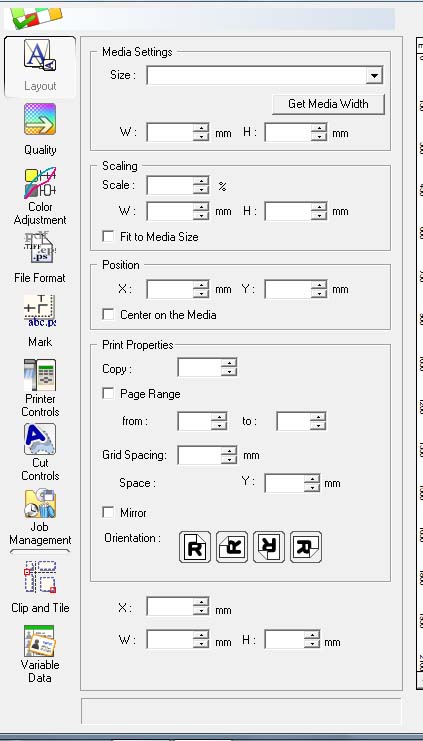
    Load up a banner I have to print, and on the layout page all the fields are blank… clicking get media size, crashed VW.

    I’ve spent the last hour re-installing VW, updated to V4 again, only to discover still the fields are blank. There’s new boxes (or boxes I’ve never used before) and I don’t have a clue what they should or shouldn’t have in them… and what they do!

    Anyone else had this problem. I am running Windows 7, and a RS-640


    Attachments:
    Jason Bagladi replied 14 years, 2 months ago 4 Members · 9 Replies
  • 9 Replies
  • Stephen Morriss

    Member
    4 October 2011 at 13:09

    I’ve updated this morning and it’s worked fine on an SP540V, not extensive use yet but the jobs that were que’d printed and there’s no extra stuff.

    Maybe some settings been ticked during the install, your image looks just the same as mine is so don’t know other than that.

    Steve

    No sorry, you do have some extra boxes and settings showing.

  • David Hammond

    Member
    4 October 2011 at 13:19

    By default though are you boxes auto-filled with appropriate data?

    These new boxes have turned up and I don’t know what they do. I can experiment and work that out which isn’t a problem.

    I don’t like the empty boxes….

    and the fact everytime I load a print and close VW, i then have to re-set all the settings. (hot)

    Roland have got an e-mail from me…

  • Mo Gillis-Coates

    Member
    4 October 2011 at 14:11

    Dave, have you done the obvious? Turn whole machine off and on again? Failing that do a system restore back to before you installed the update, then at least you can get everything back….

  • David Hammond

    Member
    4 October 2011 at 14:39

    I have turned it off, restarted, everything.

    I’ve re-installed it from the CD (V3) and then updated again… all seems ok. So far.

    Now running 4.4.3

    Just spoken to Roland, they’re aware of the issue and it only affects RS-640.

  • Stephen Morriss

    Member
    4 October 2011 at 14:52

    I’m always a bit worried when updating Versaworks, I don’t do it if I’m busy and need it all working but it’s still a PITA when it throws a wobbly

    Steve

  • Mo Gillis-Coates

    Member
    4 October 2011 at 14:52

    dave do system restore

  • David Hammond

    Member
    4 October 2011 at 14:54

    Roland support have sent me a link to download V 4.3. and will contact me when they’ve fixed the bug.

    It is a pain, but cannot fault roland as they’ve done everything possible to get me back online.

  • Jason Bagladi

    Member
    9 October 2011 at 12:27

    I have just updated from 4.4 to 4.43 as there are some added functions for the BN-20, BUT as soon as Versaworks now opens, I comes up with:-

    Roland VersaWorks.exe has encountered a problem and needs to close

    Any ideas?

  • Jason Bagladi

    Member
    9 October 2011 at 17:45

    Sorted now. Re intitialized VersaWorks and loads up properly.

Log in to reply.