

Home › Forums › Printing Discussions › Printer Ink › Roland FJ50 print quality problem(black ink only)
-
Roland FJ50 print quality problem(black ink only)
Posted by jaybo on 30 May 2006 at 20:15Good evening one and all..
I’ve got a bit of a print quality dilemma going on with me black ink only.
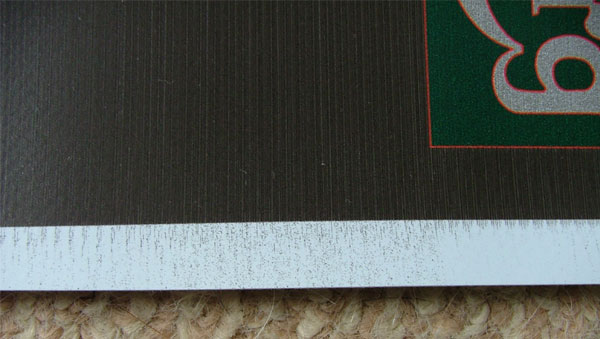
I have a Roland FJ50 (Eco-solvent) printer which uses a bulk ink system.The problem I’m having, is after each pass of the head unit the black print head leaves an over spray at the edge of the print,the length of the over spray depends on the amount of black the print head has had to of laid in the pass
Replaced the offending print head which cured the problem for about a week,and now 6 months on and many many head cleans and wasted ink later the problem still persists..
could there be some kind of contamination in the ink lines or in the reservoir that is clogging the print head from time to time??Any help or suggestions would be greatly appreciated as this problem has been ongoing for a while now..
many thanks
JayShane Drew replied 18 years, 4 months ago 9 Members · 16 Replies -
16 Replies
-

i could be completely wrong here… but something to consider.
could there be a static charge build up? i posted here about a month ago suffering same problem. (at least i think same problem) in the end it was a static charge that was cuasing a smearing, almost whisps coming from dark/black printed areas. -

Thanks for the quick reply rob,,
Static!! ouch,, that’s the stuff!!
I used to work in the coating and laminating industry several years back and know how much charge can go into rolls of material so can appreciate the charge given off when the roll unwinds,but i don’t think static is the problem because where the over spray is at its worst there is a visible band on the print, its almost as if the ink that wasn’t laid down in that pass was spat out at the end of the pass(black ink only) causing the over spray effect..i will post pics as soon as i figure out how to..
many thanks
Jay
-

Jaybo
don’t know your machine but have you tried changing the wiperKev
-
hi Kevin have changed the wiper blade but not too recently,,but since the problem started i have changed the print head, damper,wiper blade, capping station and pump, and still have the same problem.
-
jaybo, email me the pic and ill load it for you.
-

i wait for the pic.. but got some spray on cyan… i beleive it can be caused by hair in the nozzle, peizo crystal failure which is causing bad performance or cable connecting head is loose.
As u have changed head, might think u have an irregular power to the head… not sure what to suggest at the moment as I could advise you something that might break the machine but I was wondering if you can drive the head with a different power source (aka swap heads around)
-
i can tell few words about the problem, so read carefuly cause my eanglish is not so good
so, …
you know the main method to print in printers with liquid inks, is going to warm ink, making wanted preasure in small tanks in print-head and blowing ink, after that stop warming ink – the preasure go low, and at the end drying printed ink and material
when the some print-head /for example: black/ have a lot of to print in one pass, but with just few blank fields or fields with not much print, after print-head stop warm ink but only for short time, and when need to print again must warm quickly /cause need wanted preasure/, then is possible the head get unwanted small preasure /or air/ on exits /where ink go out on paper/ and you can see, on your printed material, small points of ink
that also can happened when is temperature so high for long time /over 30 C/ in room where you working
that never happened when the print-head is new
to solve problem you need to make hand-pump with gummy-baloon like, and tube with small diameter to go out rest of air in print-head
that is my expirience with DGI true solvent printer and simple solved problem
maybe my explanation is not so clear /language barrier/ but if that help you post better writed explanation for othershave a nice day
-
Thanks Rob for your speedy help putting this pic up given the time of day,well night..
Cheers Dave for your suggestions.
As you can see by the pic, the over spray in the white border (which is about 20 m/m) is much worse in the middle,where the area above is only black, but on the right of the pic the over spray is a lot less where there is less black printed above.Once again many thanks for every ones help and suggestions
Jay..
-

I’ve had a similar condition caused by a small hair hanging from the head. This picks up overspray and deposits it when the head changes direction. If the ink on the hair becomes excessive it may show on the print. I could actually see it hanging as the head moved across, although I did get seasick after a while!!
Peter
-
Hi, i have the same problem, the printer prints overspary in all colours on the right hand side, we replaced, heads, capper, pump, wiper, ink lines, new inks, and it still doing it, does we even had a tech take a look at it and he didnt know what it was, does any one have any idea on how to fix this problem. BTW we even upgraded the firmware still no luck.
-
Guys,
I understand you are using Eco-Sol Max ink from Roland on an FJ50. If so what firmware version are you running on machine, and do you have an option called ink amount in you menu mode ?
Also have you tried changing the head ribbon cables ?
Regards,
Mike
-
iam using the latest firmware from roland for this printer version 5.4, the menu does not have an ink amount, but i have not changed the head data cable, i suspected that it might be the problem, roland australia will not support me with parts because the machine has been converted and they dont want to know me because of this. Any one know of a place i can buy these data cable to try
-
Roland should still supply you with parts even if you have modified your machine. Try another Roland distributor in NZ or or somewhere else nearby. Let me know if you need a part number. They should be quite cheap.
I’ve just had another thought –
If i remember correctly, there is a metal clip (which is bright silver on the back of the head. This earths the print head to the chassis of the machine. If the area where this clip is supposed to ground is blathered with ink (and many of these converted machines do get messy) it may not be grounded properly and causing your overspray. You could remove the heads and check and clean if necessary.
WARNING – do not remove the heads if you do not know what you are doing as you could damage the machine and even blow the main board head fuses. Also make sure you know how to re-align the heads before you do so.
BTW the best way to get rid of static is static rope draped over the back of the machine so it rolls over and discharges the media as it feeds through. (I once had a situation where a company had serious static problems with a machine. It turned out that an electrician had failed to connect the earth to the ring main supply ! God knows how no-one got a serious shock.)
Regards,
Mike[/i]
-
Thanks Mike, i checked the head and those clips are toching fine and earthed, we have earted the rear roller and it looks like its not an earthing issue, this seams random, it will work like for a small print job and than start to overspray, Where is the main earth located so i can check. i may replace the ribbon data cable is see if that helps because that hasnt been replace ever, Roland australia isnt helping, do you know where i can get 2 data ribbon cable for those heads?
-
 quote Crispa:Thanks Mike, i checked the head and those clips are toching fine and earthed, we have earted the rear roller and it looks like its not an earthing issue, this seams random, it will work like for a small print job and than start to overspray, Where is the main earth located so i can check. i may replace the ribbon data cable is see if that helps because that hasnt been replace ever, Roland australia isnt helping, do you know where i can get 2 data ribbon cable for those heads?
Mate, try Australian Graphic Supplies, 1300 132 677 they service my Roland, and direct import parts as Roland will not support them either as they do bulk upgrades on Rolands with Techink.
Ask for Steve Percival or Phil Keenan. Two of the nicest guys you’ll meet.
Where abouts are you?

Log in to reply.