

Home › Forums › Sign Making Discussions › General Sign Topics › QUICK WAY TO MAKE LOTS OF MAGENTIC SIGNS
-
QUICK WAY TO MAKE LOTS OF MAGENTIC SIGNS
Posted by cre8web on 20 October 2005 at 01:17I have an order for heaps of magnetic signs, they just have a single line of text on, so i was just making 8 lines per 600mm cut, then applying and cutting all 8 in 1 go to make the signs. all good except when you don’t get it lined up just right!
Would you guys take off the app tape in one and then lay onto the magnetic base?Cheers
Hugh Potter replied 20 years, 2 months ago 8 Members · 15 Replies -
15 Replies
-

sorry mate, can you explain that again. i think i follow you but not 100%
are you applying these one by one and not getting them straight or applying all them in one go and then cutting around?im confusing myself here too now 😕
-

Thanks Rob
Well here goes, i have about 400 names to put onto magnetic base, these are just plain text, I am using a trial version of signcut on a p cut 630, this is really basic stuff, but there is so many to do, i thought i need to stream line it, i am doing 8 words at a time and making the size 600 (the text ends up roughly 55mm).
Then after weeding i am removing app tape, and dropping straight onto the magnetic roll (dry), then measuring between (28mm) and cutting.
problem is, when you have a sheet of app tape 630 x 800 + (depending on length of words) its a bugger to line up!
just looking for hints.
PS I’m fairly new to this, I normally do web design.
-
ok, cant help with software but i use signlab.
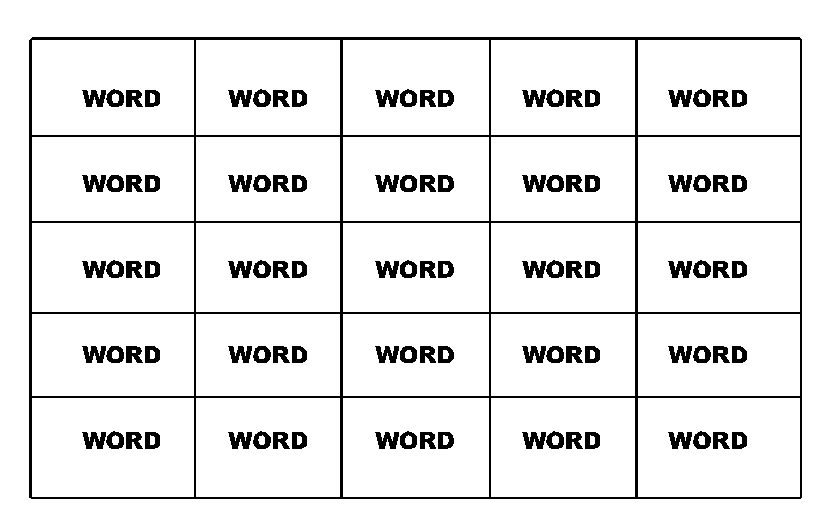
create the text in multiples like shown, you should have an “array” feature that will space it all perfect in your software. (below is not prefect by the way. :lol1:) create as many as you think you can lay in one go. important, add the lines too & cut the lot in one go… well as many as you can in one go… tape up and lay it up, remove application tape. now take ruler and cut them up using the lines as your guide. once dont remove the thin lines/guides
hope i understood you right, its a bit late here 😕 :lol1:
Attachments:
-

I think that is what he is doing Rob. What I understand is that you are applying this incorrectly positioned and therefore getting several wrong at once.
Hmmm. 😕
-
here is the deal
Basic stuff
I open Sign cut
open text box
arial bold 20blah blah
blah blah
blah blah
blah blah
blah blah
blah blah
blah blah
blah blahwhat ever the word is 8 times
set image size to 600 by what ever the legnth becomes (word dependant)
then hit cut
hey presto, i have full width use of vinyl, so no waste, just a big piece to lay on the magnetic roll, there is the trouble.
and also its pain in the butt, measuring all the cuts in the centre of the words ( to divide them into seperate signs.
it would be good to have a line to follow as rob mentioned, but doesnt look poss in signcut.
Ah well
Cheers
Marty
ps i was gunna put an image up, but i dont have an image button, (only html) is that how you out yours up?
[/img]
-
How are you attempting to place the vinyl on? Are you simply lifting the whole lot and placing it on, or hingeing it at one end with masking tape? Also, once you have calculated the spacing of your cut lines you should be able to measure and mark them at each end and cut, measuring from the edge of the magnetic sheet. Alternatively you could implement a cross hair into the layout at the correct position and use it as a cutting guide, then remove it afterwards. I don’t know your software so don’t know what its capabilities are.
-

1st. Find a piece of steel say 600 wide by a metre. Fix it to you bench with double sided tape.
That is your new work area for your magnetic. It will stay firm, flat and not move.
2nd. Sacrafice a bit of waste, cut a weed border around each text. In robs example, that will be the box lines. I do these at about 5mm.
You will end up with your lines of text within little boxes.
These box lines then become your cut guide.
Using a ruler, cut on the inside of each line, and you have the quickest and simplest way to produce multiple signs on magnetic with no fuss.
Hope that is explained well enough.
-

Another way would be to lay a few strips of masking tape on top of each other to create a thickness that you can butt the edge of the magnetic up against, then mark your cutting distances on the masking tape.
Saves you having to measure each time
-

Robs way is the best as the cutter does the hard work for you but if your software won’t do that then use masking tape at one end as a hinge, this allows you to make sure it’s lined up with the magnetic.
The leave the application tape on and measure and mark on the app tape, cut them out and remove the app tape.From what your saying your going the right way about it, you just need to keep at it, you’ll be in the swing of it by the 399th one 🙂
Steve
-

just a thought, if you cant do as rob says and use vinyl lines already cut, to follow,
then how about leaving the app tape on the sheet once applied, and then using a pencil, draw your cut lines on with a big ruler, and cut using those ?
i can’t see a quick way around it really, unless you can get use of a guillotine with a stop behind it, that way you’ll have perfrct spacing every time.
oops, that’ll teach me not to read all the replies ! do what he said above ! just ignore me !
-
You excused Hugh, looks like you were up as late as me. 🙂
Was printing all evening, some posters for an artist, wants them for Monday! & then another call last night for a roll-up for Saturday 👿
Anyway they give me plenty of work, I must be too cheap.
Steve
-
i’d only just got in Stephen, fishing trip with a customer !! bit too blowy so came home early, with an order though !
-
Well, thanks so much for all the replies, what i have done so far is,
leave the app tape on, then line up, then cut, then peel the app tape, seems much better to cut too with the app tape on, even though we have a non slip rule, it seems firmer to cut with the tape on.I really do appreciate all the input. i tried to put a photo up, but done have the option yet. Maybe i need to ask for it?
Marty
-
you’d need to post a new topic in the portfolio section i think, you cant post images in this forum. H


Log in to reply.