Home Forums Sign Making Discussions CNC Router and Engraving Problem connecting to System 48

  • Problem connecting to System 48

    Posted by Adrian Neill on 5 September 2012 at 12:31

    Afternoon all.

    We seem to have developed a problem (again) with our System 48 Router. Whenever we try and send a job to the router we are getting this error message on the screen. I’ve checked the cables etc and everything seems to be plugged in properly.

    We’re using ArtPath to run the router, but this I have very limited knowledge of.
    This is the error message :
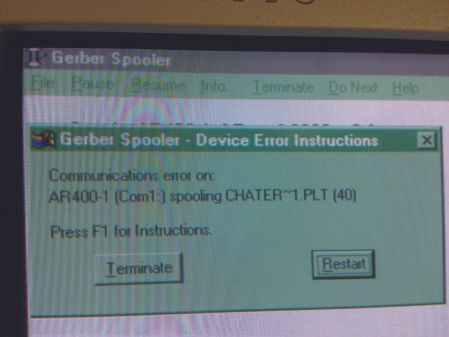
    Anyone have an idea of what might be up that I can try ?

    I’ll be honest, this System 48 is fairly old and the ArtPath program seems ancient to me so am considering whether it’s worth investing in some new equipment ?


    Adrian Neill replied 13 years, 3 months ago 3 Members · 7 Replies
  • 7 Replies
  • NeilRoss

    Member
    5 September 2012 at 13:26

    What does pressing F1 (Help) tell you?

  • Adrian Neill

    Member
    5 September 2012 at 13:32

    Hi Neill ….. just say’s to check the cable and that both ends are switched on. 😕

  • NeilRoss

    Member
    5 September 2012 at 13:43

    Have you tried the famous shut it down and restart routine! PC and router. Start the router first – then the PC. I take it that is a serial connection (COM1) you’re using, and somebody hasn’t reset the config in the software from parallel (LPT1)? Just a thought.

  • Adrian Neill

    Member
    5 September 2012 at 14:39

    Right …. i think we’ve found it.

    I just checked with the person who was looking into it and they hadn’t tried a different serial cable !! After trying one from one of the plotters we seem to have a connection but it’s not sending all the information through, so looks like we need to source the correct serial cable.

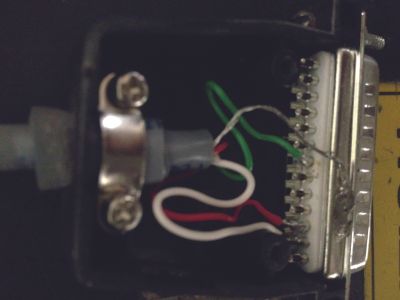
    These are the connections inside the plug at the ’48’ end … not sure if this means anything to anyone ?

  • NeilRoss

    Member
    5 September 2012 at 14:45

    If you think it’s a problem with the original serial cable, open both ends of both cables and compare the pin settings. Remember to mark the original cable so that you know which one you are copying from.

  • Tony Teveris

    Member
    6 September 2012 at 20:17

    I agree, it sounds like the cable. If you need the pinout I can get it for you. Send me an email. If the cable has been laying on the floor all these years and people stepping on it you never know.

  • Adrian Neill

    Member
    7 September 2012 at 06:44

    Thanks for the replies.

    Yep, seems it was the cable. Managed to find a company online who can make custom configurations who are going to charge us £23.00 for a 5m cable, so not a bad price to get the machine up and running again.

    Next job is to get the router serviced I think and get a few more years work out of it.

Log in to reply.