

Home › Forums › Sign Making Discussions › File Swapping › Logo & univers75 font needed please?
-
Logo & univers75 font needed please?
Posted by N Corkhill on 16 December 2005 at 00:28Hi There, brand new to this forum and signing itself, but could do with a little help please.
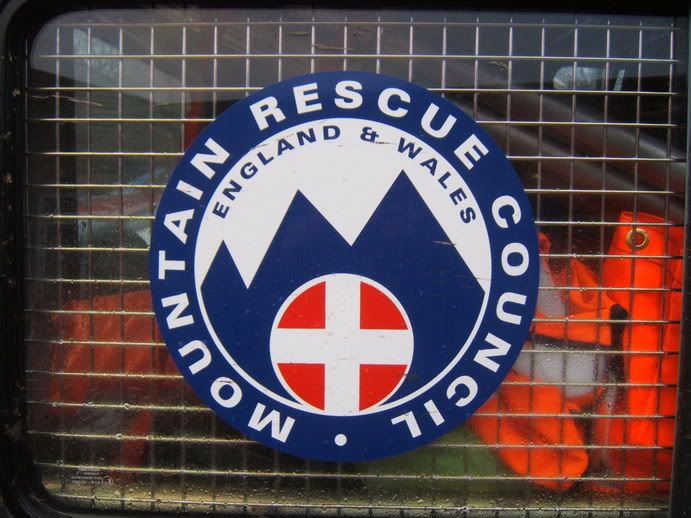
Two part question, what is the font used, also what is the best way to reproduce this image (got Corel Draw 12).
Thankyou in advance to any advice given.
Cheers Norm
Hugh Potter replied 19 years, 10 months ago 12 Members · 25 Replies -
25 Replies
-

Hi Norm,
Try Helvetica Black, Or frutiger Black, Or Arial Black.
With corel Draw easy work with layers .I CAN DRAW IT FOR YOU WONT TAKE ME TOO LONG AND ILL POST YOU BACK THE .EPS FILE
Are you gonna print it yourself or send it to someone?
I use a printer that can do it in one piece . So that’s what i would do.Let me know
Nancy -

With respect, I think it looks more like two weights of Adrian Frutiger’s Univers. This is 75 Black, the G particularly is very distinctive.
I remember the unusual form of the ampersand as well (an old client had it in their logo), but it isn’t shown here, it must be an alternate character.
I’ll keep looking.
Richard
-

Richard you Girly swot 😀
This image would be an excellent candidate for a tutorial on vecorizing as it contains many of the common techniques used everyday in the signshop.
Text manipulation, text to curve, contours, trimming, combining etc
Got me thinking now 🙄
paul r
-
I resemble that remark 😉
Anyway, I found it, thanks to my trusty old Letraset catalogue.
Good idea about using this as vectorising tutorial material Paul.
Richard
Attachments:

-

Wow thankyou for your response.
Nancy that would be fantastic if you could, it is for me to cut out for a customer.
As I mentioned I am new to all this, Paul as you mentioned a tutorial is there any on this site that covers Corel 12 at all? as I am finding it a bit frustrating at the moment, what would be the best package to start off with?
Thanks again.
Cheers Norm
-
Hi again, I have just checked and I dont seem to have that font, any ideas where I maybe able to download it from please?
-

do a quick google search for fonts, most are freeware or free download, looks for them though, if you request it in a search it’ll always want money !!
-

Norm, welcome to the boards and the sign making industry, when you get a moment, perhaps you can share with us and ‘say hello’ to us so we can get a feel for who we are talking to.
Short cut the the Say Hello forum
http://www.uksignboards.com/viewforum.php?f=14We are a friendly bunch here.
-
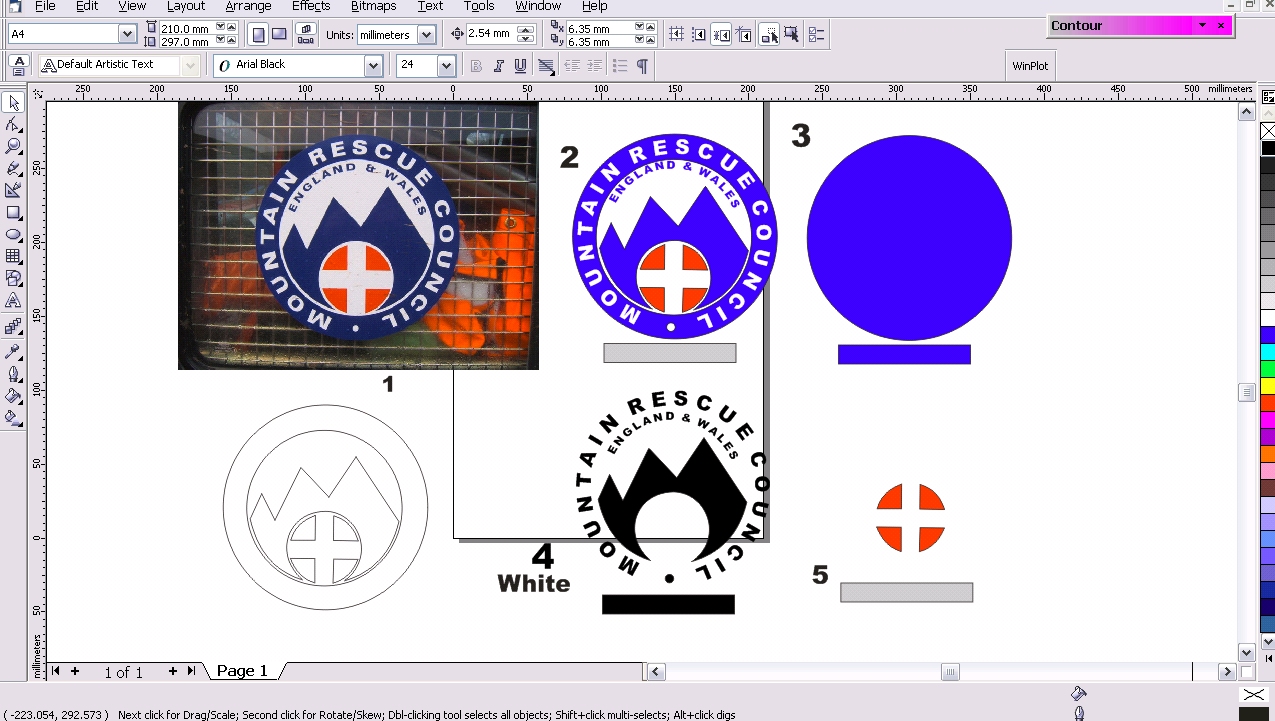
hey dude, for my own reasons i thought i’d see how long it took me to re-draw the decal you want, took me about half an hour i guess, but five mins of that was wondering why the text was running backward around the line i drew, i’ll explain in a mo !
although there are a couple of ways i could/would do this, this is the method i used just now.
1, import your photo into corel, size it to whatever size it is, right click and lock image,
2, draw 2 circles using the circle tool on the left hand tool box, matching them to the outer edge and inner circle of the design,
3, using the smart drawing tool (4th down on left), click on the corner of the mountain once, take the tool to the next point (end of straight line) and click once, click again on the same spot and repeat until you’ve drawn the angles, now you’ve got the rounded edges, draw a line (keeping it continous) to the bottom corner of the curve, not a line to the centre of the iner circle now one back down to the corner, and back to the start position,
4, now, to make the straight lines on the curves curved, you need to select the ‘thingy’ (new word) tool, second tool down, click the line you wish to bend, then right click on it, select “to curve” and bend your line to match the drawing underneath, do the same with each of the lines until you’ve made it as accurate as poss, remembering to check you’ve made the two halves of circle circular,
5) do the same with the england cross, just draw the red bits ( i usually now group all the items together at this point and move them outta the way (fig 1)). the circle at the bottom was just drawn as a circle and resized to suit.
6, now the text, draw a line along the underside of the text, in this instance i drew 3 lines and curved them to suit in the same was as the mountain base, mak sure the curve has a continuous look to it,
REMEMBER, draw line right to left, as the text will always follow the direction of the line, took me a while to figure out why mine was backward !
7, using the chosen font (i just used ariel for this example), write what you need and size it to match the size of the letters on your photo, not select the text, click on ‘text’ on the tool bar at the top, click ‘fit text to path’ and click the big black cursor you now have, on the line you just drew over the photo,
8, you can adjust this text to suit the spacing (kerning) by selecting the ‘thingy tool’ (second one down), and clicking on the text, drag the arrow beneath the text to the riht and it’ll spread out the text and hopefully match (the start finsish points if nowt else) the original text, to move the text around the line just push or pull the litle red triangle,
9, now select the line the text is sat on, and hit delete to emove it, now manually place the text on your design, and repeat the above for the second line of text,
10, now you have a complete drawing you’re nearly there, copy and paste the original, and draw a box under it, now copy and paste it a further 3 times,delete the various parts to leave the three ‘layers’ and once you’ve coloured them you should now end up with what you see on the screen below !
once cut, weed out the waste on the white a shown, to leave only the text and mountains, then mask as usual, when applying use the box to align the circles and away you go,
do the first layer (blue circle fig 3) first, do it dry if poss, the following layers could be done wet if you prefer, it’ll make aligning the box easier at least, do the white layer next (fig 4) and then the red layer last, if poss, whack some heat over the entire decal, especially at this time of year !
i’d suggest reading thru this a couple of times, and then follow it as you go, if you’ve not done it before it’ll probably take a litle trial and error, but you’ll soon get the hang of it,
have fun !!
Attachments:
-

hugh, you’ve muddled your colours!
Good bit of editing there though, well done!
I haven’t read thru’ the steps, as I don’t use Corel, but I would use the diagrams as you have, but
Step 1 cut in blue, weed as appropriate. (remove the red segments before cutting, not needed yet)
Step 2 lay blue over white circle as a complete piece
Step 3 lay red segments over small white circle
Use of guide strips for lining up-EXCELLENT! (Thank you Rob for that demo)
How confused are you now, Norm?
-
i think i sorted it now !! had lready edited it a couple of times, and the final edit eplaced the photo and properly edited the text, but it seems it didnt edit the text for me !! now sorted,
initially i usd a white backing circle, then a blue cirlce with the text / mounains weeded out, but this would be tricly to aling the two cicles exactly, so altered it as it should be now !
-
Hi there, sorry about the delay. That is fantastic instructions thankyou, I had a go and it help a lot. I still have a problem with the font, I am not that good with the internet thingy, and when I search for the font, all I get is sites trying to sell, so tip please on getting around this would really be of help.
Again a big thankyou for all your input.
Cheers Norm
-
quote N Corkhill:Hi there, sorry about the delay. That is fantastic instructions thankyou, I had a go and it help a lot. I still have a problem with the font, I am not that good with the internet thingy, and when I search for the font, all I get is sites trying to sell, so tip please on getting around this would really be of help.
Again a big thankyou for all your input.
Cheers Norm
you#re welcome !
go to google.com and search for ‘free fonts’, about a dozen websites wil come up, you’re then free to download what you want, save them to a cd or removable drive, then go to ‘my computer’, ‘c’ drive, ‘windows’, fonts, and install fonts fom there you saved them, done,
check out the ‘read me’ files though, some fonts come with them and require you to seek permission to use them,
H
-
There’s lots of links on the link page here for free fonts.
Nick
-
Hi guys, after searching for, well I lost track of time I was unable to locate the font “univers75” as mentioned above. Can anyone point out where I am going wrong please?
Cheers Norm
-
Hi there, good and bad news, I am able to locate the univers75 font, but not for free. The thing is I am doing this job for free as a donation towards the “North wales rescue services”, and so cant not afford to buy the font as well as supply and fit the vinyl. Can anyone help me with this matter please?
Thankyou.
Cheers Norm
-

Just use Helvetica or a similar font.
The client probably can’t tell the difference.
This has practically been done for you anyway by all these helpful folks.
If you are going to be a sign maker you’ll need to learn to help yourself.
Love…Jill
PS
Welcome aboard. -
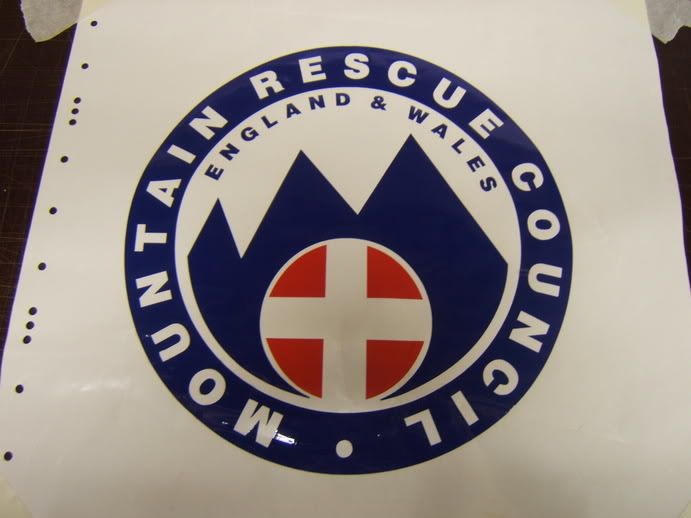
Hi there, well here we go, I gave up on the univers75 font and made it any how , taking advice from Jill. Going to show the client this week before I go ahead with making the full size version. It was so easy following the instructions given earlier, I would never have got it done without them.
Anyway big thankyou to all helped out.
Cheers Norm.
-

Well done Norm.
Cant tell by the pic, but I assume its cut vinyl?
The only thing I would have done diferent than the tutorial is to have the white as the bottom layer, not the blue.
That way the white is just that bit whiter than being on top of the blue.. thanks for showing the finished item.Peter
-
There ya go, Norm!
Isn’t it satisfying knowing that you did it yourself?
And you learned something in the process.
Good for you!
Love…..Jill -
Hi there,
I would just like to say a huge thankyou to all who responded to my question from last year.
And especially to wannousnancy for being the first to help out, Hugh Potter for your fantastic instructions and Jill Marie Welsh for the kick up the jacksee :lol1: .
I have since learnt a bit more about using Corel and vectorising and love doing it now, although my knowledge on the subject is limited at the moment but it is getting better the more I try, I still find myself coming back to this page to recap.
Thankyou 😀
-
glad to be of help ! i said you’d soon get the hang of it !! i still occasionally ask for advice reards corel 12, but more often than not, i find things by accident and then learn to use them properly, the secret is remembering what you did to achieve a certain result ! i oo quite enjoy redrawing things, quite satisfying when you get to the end result !



Log in to reply.