

Home › Forums › Sign Making Discussions › File Swapping › Job Sheets
-
Job Sheets
Posted by Chris Dowd on 23 June 2006 at 20:58Hi guys,
We are just in the process of putting together a new job sheet, does anyone have any examples of theirs they would like to post?
Thanks
Chris
Carrie Brown replied 19 years, 6 months ago 18 Members · 24 Replies -
24 Replies
-

we use 3 part paper… one to fabrication workshop/fitting, one to filing cabinet/invoice/or gets lost and one to print/cut rooms.
-

I don’t use them anymore chris. A job and details goes into my diary, and I work from that.
-

Hi,
My sytem is very basic…I have a clipboard with 7 columbs.
Job No. – Customer – description – cut/Printed – Taped – Completed – InvIt gives me a quick referance guid as to where we are at. I can then look down the last columb and see if there are any blanks… if there are they have been invoiced.
The Job cards we use are very basic… we fill in basic details and description.. check clipboard for next available job no. If they have artwork attach it to card then put it in the in tray.
Ince a job has been completed we import a completed job card into the file and put it around all the artwork fill in the price colours etc.. then print it out to fit page and put it in the to invoice box.
When doing the invoices have the clipboard next to PC and as they are done we then fill in the last coloumb of the clipboard sheet with the invoice number…
May sound a little complicated the way I have described it but it works well and I can tell what stage everything is at and more important if I have done an invoice.
Attached one to look at
Cheers
Ian -

I’m very organised….. 😀

same as dave i guess… 2 sheets. one gets filed the other goes to artwork/next step and so on.
as soon as artwork has been confirmed and produced a final draft is printed off and invoice is raised based on the artwork etc -

This is the job sheet we use.
The details are entered and the form is sent to the workshop. When the job is done they return it to the office and an invoice generated.
Job sheets are printed on pink paper, enquiry forms on green, the fax machine is loaded with yellow etc etc. That way, no matter how untidy it gets, a piece of paper is identifiable for what it is from the ther side of the room.
I’m interested in this topic because, although our system has stood us in good stead for many years, it was devised in the days when there was just me and a girl working here, and I feel that we now need something a bit more comprehensive to cope with the extra volume we are dealing with. Years ago we used to get compliments on our system but I doubt that we would now.
Keep it coming folks. I need the input.
-

We use a very basic sheet, customer details/job details are entered and then we write on the sheet, artwork, cut, taped, assembled, sent or fitted and date.
At the bottom I just circle how paid or if it needs to be invoiced.
Then Faye will use the sheet to invoice from.
-

Thanks for your replies so far guys, with 31 downloads of Ian’s and 28 of John’s it looks like I’m not the only one looking at this at the moment 😀 😀 😀
-
Hi,
Can not belive so many downloads…
Would be interested to know if anyone plans to use them.Guess they must be something people want.
Cheers
Ian -

I opened both but didn’t download, just looked, for ideas & to see if I could improve my system (sure I could!)
-

I use an Excel spreadsheet at the moment as it works for me. I’m working on integrating a stock database lookup….as and when time permits!
Adam
-
quote Lorraine Clinch:I opened both but didn’t download, just looked, for ideas & to see if I could improve my system (sure I could!)
😳 me too, just being a sticky beak actually 😳
-

I opened both as well ’cause I’m a nosey sod!
They both look good though and I really need to implement something like this because I’m crap at paperwork.
Cheers
Joe
😛 -
Ha !!!
I’ve overtaken you Ian. 75 to 71 at the moment. 🙂
Let’s have a few more examples folks. Don’t be shy. We can all often get useful ideas from seeing how others work.
-

I use a book I forget to look in, have also made job sheets forget to fill them in or peter forgets just rely on the memory which is not too good !!!
must try to be more organised 🙄Lynn
-

Lynn – my job sheet is as good as yours!!! :lol1: I too rely on my memory a lot (which is fine until Alzheimers sets in!) but I regularly note jobs on a large dry wipe board in my office. I have it sectioned and use part of it for what’s to be designed, completed and invoiced etc.
Thats as far as I get I’m afraid…. 😳 -

I don’t have a job sheet as such – but have forgotten to invoice work in the past so some sort of system is nessessary 😕
The system I have now is a "work in progress list" . Whenever a new order comes in I add it to the list. Only once the job has been completed and invoiced (or receipted and paid) does the job get scored out and taken of the list.
I think Job sheets are very nessessary for companies with a few staff in order that everyone can track a job. However, even the "one man band" needs some sort of work in progress system to ensure that each job is carried out to completion. It’s suprisingly easy to lose track when you get busy and are relying on your memory to keep up to date.
-

I must post my Job sheet tomorrow.
I am fasinated that you guys can run a business without a job sheet as such, I have loads of jobs on the go in various stages of development, I will give you the figures tomorrow and see how they compare with others situation.
Cheers
Dave
-

I know what you mean about altzhiemers
Made the sign for a front of a vehicle ABNORMAL LOAD delivered and it was supposed to be ESCORT VEHICLE doh!Goop
-
So do we Dave in the passed it’s been memory now we need something trustworthy. 😛
Lynn
-
OK here is how the numbers are looking on my T Card system, 27 Enquiries, 26 Quoted, 13 Design, 16 Hold, 24 Go Ahead, 9 To Assemble, 19 Completed, 21 Invoiced.(That means 21 customers have got their sign and not paid)
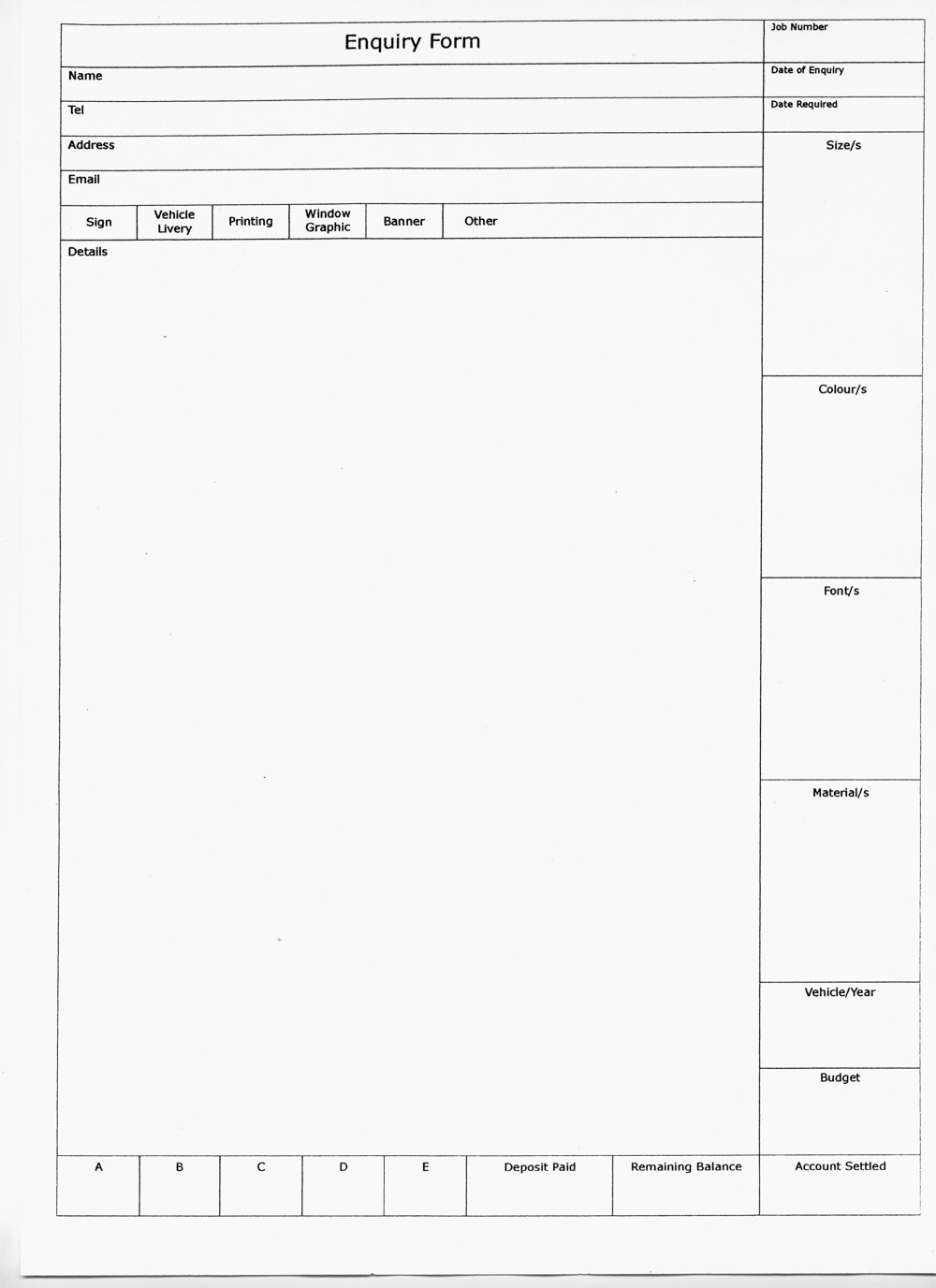
Here is the Enquiries form I use along with the T Card system and file trays labeled the same as the T Card system so files can be found quickly by anyone looking at the T Card system.
Hope you follow that.
Dave
Forgot to say the A B C D E on the form is for each item I quote for, so someone might be getting facia sign (A) and stationery (B)
Attachments:
-

Each client gets their own folder from the time of confirmation of order, we fill in a job sheet which is similar to higgis sheet, that then gets stapled to the front of the file, anything relating to that client and that job gets put in the file eg. letterhead, buiness card, artwork supplied etc. That file is then placed in the "jobs to do" tray or "quoted" tray, if its a job to do it gets noted on the jobs board too (drywipe board) once the job is completed the file comes to me for invoicing and breaking down.




Log in to reply.