

Home › Forums › Vinyl Cutter Discussions › Summa Cutters › Help with Summasign pro T750
-
Help with Summasign pro T750
Posted by simon j denver on 21 March 2013 at 20:55Hi all…
i could do with a little help with a summasign pro t750 that ive been given as money owed to me.
Does anyone have experince with these are they good bad what they worth etc
Hope someone can shine some light on this model for me.
Cheers
Mark Lord replied 8 years, 8 months ago 8 Members · 24 Replies -
24 Replies
-

I have no experience of these machines, Summa are a good brand of cutter though and i know there are loads of users of the machine on the site. so im sure you will get help on this.
The problem with any cutter or printer is like a car, the miles its done and how well it has been maintained.
Age doesn’t really matter on cutters, if properly maintained they will just keep running, particularly the old models as they are built more robust than the new ones. however, when they break down, even sometimes the most simple of parts, you will be stuck to buy a new one as they are no longer available. -

Thanks robert
Some good info there i never thought about..im hoping i can use it for basic lettering for now to put me on.
Ive tried to google the brand and the main sites seem good and they get a good review would just like to know abit more about the 750.
-

it was top of the range in its day and if in good nick will be a joy to use
http://www.summa.be/download/ss_t_en.pdf
what else do you want to know
-
quote Chris Wool:it was top of the range in its day and if in good nick will be a joy to use
http://www.summa.be/download/ss_t_en.pdf
what else do you want to know
thanks chris…i cant seem to view the pdf on my phone..will get on thelaptop later
the plotter has been well looked after.
does anyone know what these are worth
-
im now a happy boy….just got the summa
although its now a minefield gettin it set up….also ive no leads with it including no power lead
-
that link is for the user manual and i have double checked the link as OK they were mostly set up on a serial port don’t think usb was about then.
depending on what software you wish to design in set up and drivers- opperating system could be a bit aquward. -
quote Chris Wool:that link is for the user manual and i have double checked the link as OK they were mostly set up on a serial port don’t think usb was about then.
depending on what software you wish to design in set up and drivers- opperating system could be a bit aquward.Checked over it quick and yeah it has serial port…
I may try and give summa direct a call on monday see if they recomend anything. I havent a clue where to start. Ive corel 9 and flexi sign for software choices.
The Summa was an inherritence but im guessing it could be harder work than i thought.
I wonder if its worth anything to put against a new one.
-
flex sign should drive it corel needs the summa windows printer driver or a plug in program might be called go cut
the lead can be made quite cheaply if good with a soldering iron see what summa want for one 🙁
-
quote Chris Wool:flex sign should drive it corel needs the summa windows printer driver or a plug in program might be called go cut
the lead can be made quite cheaply if good with a soldering iron see what summa want for one 🙁
Thanks for the help and advice chris.
Ive been searching google no end, i dont suppose you would know of the best place to source the cables needed
im presuming ill need a driver for it too, i feel a headache coming on.
I just dont know where to start.
-
you basically have a choice then
spend £1000 on a new 610 width plotter that’s plug and play as the pricing is quite keen between dealers doubt they will offer much for the summa.
chuck in on ebay and forget all about it find something else to do
or persevere and learn a lot more.
summa direct sell all thats required to work that machine as i say at a price you may find acceptable or not.if you have flex sign it should know about that machine and have the driver built in to the software so in theory only needs a cable i could be wrong.
to run it from corel with a free driver can be done but is more that i want to type on here,
-
Cheers chris
i certainly want to learn more.
i intend to phone summa direct and hopefully go from there.
-

I’ve got a Summa T750 pro with opus. 11 years old and in daily use, still regarded as my new plotter :). I run from both Signlab V9.1 and Corel Draw X6 using WinPlot which you can download from the Summa site (or always used to be able to) I run mine Serial 19200.n.8.1.p on Com1
Alan D -
quote Alan Drury:I’ve got a Summa T750 pro with opus. 11 years old and in daily use, still regarded as my new plotter :). I run from both Signlab V9.1 and Corel Draw X6 using WinPlot which you can download from the Summa site (or always used to be able to) I run mine Serial 19200.n.8.1.p on Com1
Alan DThanks for the reply alan
its nice to know someone is using same model. im hopefully going to contact summa uk for a cable and see what else they can tell me.
did u have to install any specific extra drivers….with this being second hand ive got nothing with it.
but it was free so cant complain.
-
You just beed to download and install Winplot, everything is in there. You can also dowload Summa cutter control and you will be able to set up plotter from PC – you can do it from the plotter and that is my preferred method
Alan d -
does anybody happen to have a contact number for summa uk im.after some parts.
-

Simon
don’t think Summa have a UK office but Art Systems are uk distributors but they may redirect you to one of their retailers as they are trade onlyKev
-

can you not just pick up a serial cable from your local pc shop??
-
thanks for the reply guys..ill look into it.
ive no power lead either for it.
-
just tried a spare tower power lead and guess what…..it works. brain in gear.
just need to sort a cable now ive got a serial port and parallel
-
I can’t remember how the serial cable is wired ie which pins are jumpered (if any) but I’m sure the wiring diagram is in the manual. A google search should find it failing that I’ll see if I can find mu old manual, it must be about here somewhere.
Alan D -
could be better explained but its in the manual i posted before
-

Simon, That is an awesome plotter. I own a D60 Summa and wish I could find one. You will be amazed with the tracking especially if you use the flanges that go in the ends of the roll of vinyl.
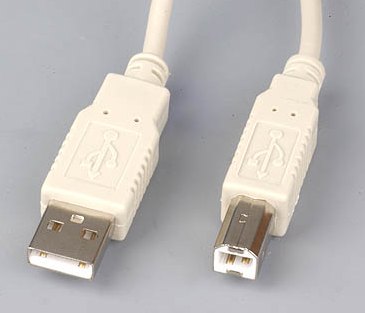
According to the manual there is also a USB port on the back. That’s how I have mine hooked up. and it works fine.
You could go to SummaUSA’s site. The great thing about Summa is that they offer lifetime support no matter if you are the original owner or the 10th owner. They would be able to tell you which cable to use.
There are also drivers that you can down load from the site, including USB drivers.
The serial cable I believe is a Null Modem cable or a cross over cable.
The USB cable is type A on one end (computer) and type B (plotter) on the other end. See Photo.Hope this helps and you get your plotter up and running soon.
Attachments:
-
Evening UKsb
thought id update ive now got all the cables etc and downloaded winplot and user manual so fingers crossed i can maybe get it talking on monday at work.
Next thing will be to work out the best software within budget to work with.
Thanks for all the help and comments so far esp dirk at summa europe
-

I have the Summasign Pro T1400, have had this for years and never goes wrong. I can contour cut with using the OPOS.
All i use is CorelDraw and Winplot that is free from summa’s website. When winplot is installed there will be a new dock with the summa cutter tools on the corel screen, just select the items to be cut and click the relevant button and it will open winplot and just click send.
Its as easy as that.
I believe the cables are a null modem cable, a standard serial cable wont work.
Thanks Mark.

Log in to reply.