

Home › Forums › Printing Discussions › Roland Printers › Do I need new print heads?
-
Do I need new print heads?
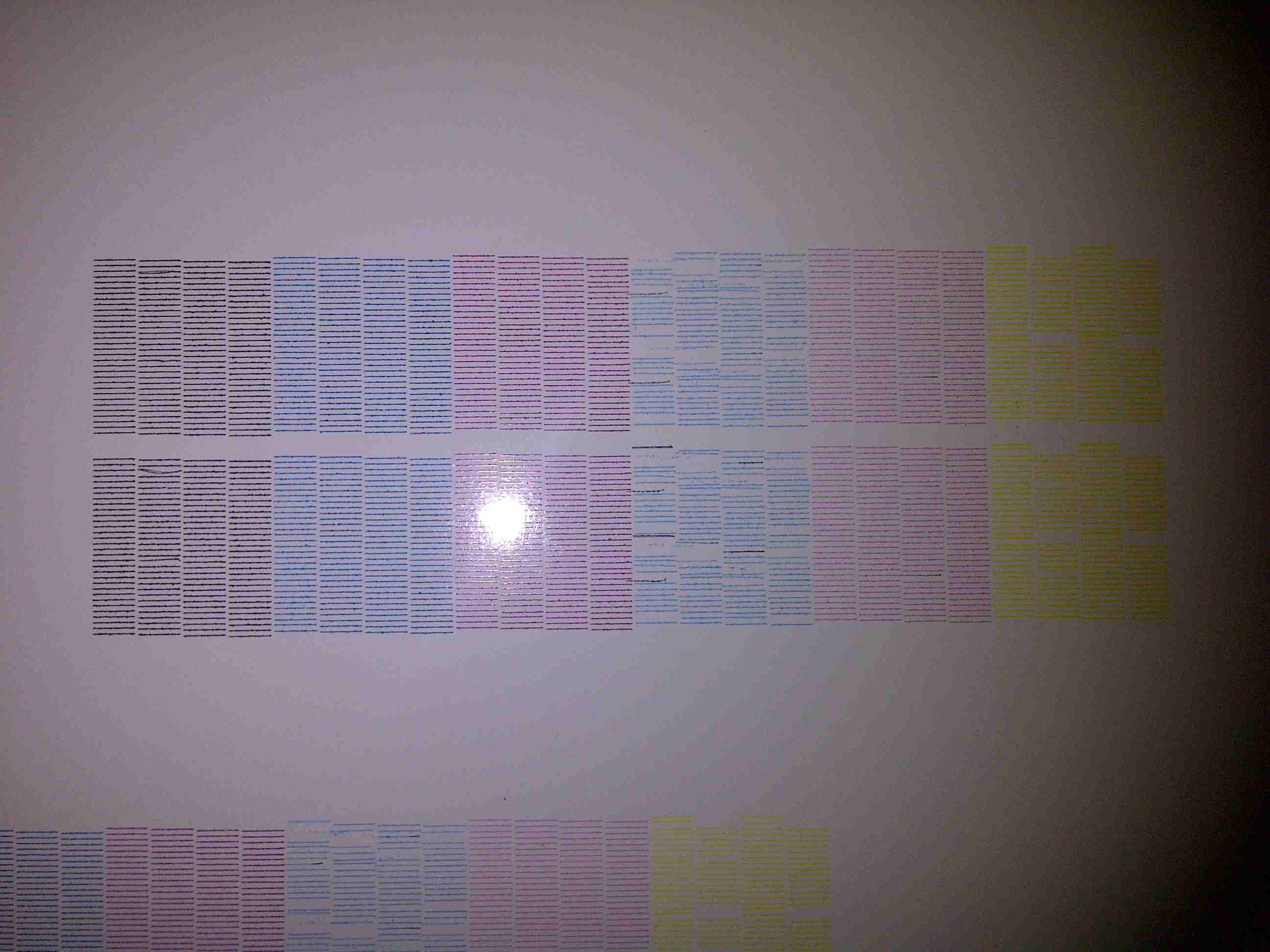
Posted by Craig Gibson on 23 April 2012 at 20:28Hello all, Ive just put new dampers in and a new capping station but attached is a
test print!
When I print anything the colors are away off, new heads needed?
Thanks in advanceCraig
Attachments:
 Robert Lambie replied 13 years, 7 months ago 5 Members · 24 Replies
 -
24 Replies
-

light cyan looks in bad shape, but yellow may just need a good long head soak and maybe a power clean?
to be honest though, i wouldnt have thought the colours to be way out, just quality of print.
looking at your test print ( and remember i am a sign maker, not a printer technician ) but your profile doesnt look to clever.
you are only printing thin lines of colour and it looks as though its not taking to the media well.
is this a new ink or recently changed inks ?
ide have thought if this is the case it might be why your colours are way out.
are you using a different media to your norm? -

Hi Rob, thanks for the quick reply.
it’s been soaked and cleaned a number of times.
Same media, ink and profile!
When I go to print a bright orange it’s now a dark red or a yellow is now nearly green.
Don’t want to spend on new heads if it’s not going to sort my problem!
Any other ideas?
Craig -
As i say mate, im not a machine/print tech… But your heads are firing. ok yellow isnt great but is almost there… light cyan is very ropey, but would that colour even be used to create bright orange? doesnt really make sense…
could your ink lines contaminating one another caused when changing the capping and dampers?we had something happen like this years back and it was ink contamination of some sort. sorry, i forget.
maybe someone else more clued up on this will read and advise you better.
-

Have you tried a "Test Print" to see if it prints the correct colours?
Neill -

don’t know much about the 500 does the head go over a sponge before printing if so is it swollen and rubbing the head.
that would account for some of the colour lines in the wrong place. -
Hi Craig,
Sorry about my previous post, I have just noticed your photo of your test print. The LC looks a bit poor. With Roland’s the "Powerful Head Clean" is a bit too aggressive for me so I just do a normal one as with mine the powerful can make it worse. I have also seen an engineer tighten the dampers (I think they are called) you know the nut thing under the printer that tightens the rubber drains to the bottom of the head. He then connected a big syringe to the end of the thin drain pipe (that goes from the bottom of the head to the drain bottle pipe) and sucked ink through the head. I think it might suck two inks at the same time. This helped our Roland SC540 but it’s up to you if you try it.
Neill -

As Rob said your light cyan head is a bit ropey but it shouldn’t make your colours change that much, are you sure you connected the right lines back to the right heads?
I’d also try the syringe in the capping station to suck ink through that one head, seems to be better than a head clean when they are that bad.
Steve
-
Chris, no problem with sponges.
there are two new ones in capping station.
Neil, Stephen the lines are clean and its draining fine, although I might give the syringe a go. -
Hi Craig,
Find the biggest syringe you can get. One that’s about an inch in diameter by 4 or 5 inches long. The small rubber pipe should just fit over the end of the syringe with no mods. You should not need to fill the syringe though just the first ½ inch or so.
Neill -
You may also need to turn the pump slowly by hand until you find the place were it’ll let ink pass through.
I’ve always found it daft that Roland haven’t provided a single head clean cycle in the cleaning menu.
Steve
-
Thanks everyone, have tried the syringe plenty of ink through but it’s
No better. Intact it’s worse.
Tomorrow will be my their day waiting on a call back from Roland! -
Hi Craig,
Sorry to hear it did not work.
I may be teaching my granny to suck eggs (forgive the pun) but when you said you got lots of ink . . . was the ink a single colour ie C or M or Y or K etc. or was it a mix of 2 of these colours. When you use the Syringe it would be sucking 2 colours at the same time ie LC & LM say so it should look purple. To help you can clamp the one pipe you don’t need and then it will just suck through the bad head.
PS Do you soak your heads in the machine? If so do this first, for a couple of hours, to loosen any hard ink deposits in the head before syringing.
Neill -
Thanks Neil, I have done both and left to soak 24 hrs.
Do you think new heads would solve my problem? -
It looks that way but they won’t be cheap.
I have got heads back before (from a similar look to yours test print) but they won’t last as long as a new head would anyway. A friend got some recently from Germany at around half the price of the UK and they were OEM Roland heads and came in 48 hours.
Neill -
Thanks Neil gonna bite the bullet and buy.
I have got other parts from digiprint supplies in Belgium.
They seem cheap and next day delivery to N. Ireland. -
All the best and you will soon be back to full print.
P.S. Just off to one side. I always found it difficult to see the yellow test print pattern and a photocopier engineer told me to buy one of those small Blue LED torches. Cost me £1.50 from a joke shop of all places. Just point it at the Yellow and after 2-3 seconds your eyes adjust and you can see the yellow lines darker.
Neill -
New heads in and it’s like a new machine!
Thanks to you all for your help. -
quote Craig Gibson:New heads in and it’s like a new machine!
Thanks to you all for your help.great to hear mate. thanks for the feedback after resolving.
did you self install the heads?
if not, other than the heads in, did the technician do anything else to help resolve or was it purely damaged heads?
How did you find Digiprint to deal with?
sorry, just me being nosey on all accounts. 😀
-
Hi Rob, self install. Just took my time and did exactly as in manual.
I have to say Digiprint are probably the most efficient company I have dealt with and any questions were answered straight away, as well as the prices being great.
The wife loved them because they sent chocolates with the order! -
Ps, still waiting on Roland to call me back after phoning them 3 days in a row nearly two weeks ago!
-
great stuff craig, good to hear they ticked all the boxes mate.

Log in to reply.