Home Forums Sign Making Discussions File Swapping Advice: Could this graphic be cut?

  • Advice: Could this graphic be cut?

    Posted by John Cooper on 29 June 2008 at 08:47

    Hi guys

    My inability with Coreldraw is no secret 🙂 I must learn the skill of manually tracing.

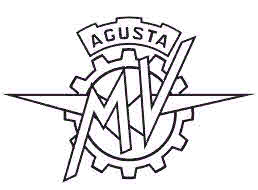
    Is this logo suitable for cutting? The lines are quite thin and when I do try the auto trace facility in Coreldraw the end result looks iffy – curved lines are not smooth and the disatnce between lines that should be constant, varies.

    The letter are not exactly good to start with so at least I would expect to remove them and use the text tool.

    My cutter is a Graphtec CE60 and the design is destined to be pressed on a T-shirt about 9cms across in total and proportional.

    John


    Attachments:
    John Childs replied 17 years, 6 months ago 6 Members · 9 Replies
  • 9 Replies
  • Peter Normington

    Member
    29 June 2008 at 09:24

    Heres one I made earlier, it will cut but a pig to weed if very small

    Peter


    Attachments:

  • Phill Fenton

    Member
    29 June 2008 at 09:48

    I agree with Peter – very difficult to weed the fine lines.

    I’d be tempted to introduce some colours. This way you would be weeding larger blocks that could be built up in layers to recreate the image.

    e.g in this suggestion lay down the black first – then overlay the yellow and red.


    Attachments:

  • John Cooper

    Member
    29 June 2008 at 10:46

    Thanks for the replies.

    How the heck do you trace that Peter? Is Illustrator better for tracing than Coreldraw? Thanks anyway.

    I agree, it might be a pig to weed especially as I have to do 30 of them!

    Thanks for the colour seperations Phil – I might have to go this route. Of course I could always use sublimation 🙂

    Cheers

    John

    PS I’ll let you know what we do.

  • Peter Normington

    Member
    29 June 2008 at 11:49

    John I vectored it rather than traced, it took maybe 15 minutes.
    I use Signlab as my weapon of choice. Take a look at
    Andrews demo. http://www.uksignboards.com/viewtopic.p … 545#281545

    Peter

  • John Childs

    Member
    29 June 2008 at 13:26

    John, mate, I say this with all due respect, but……

    If you are going to stay in this business you really have got to learn to vectorise stuff. Skill levels vary but, even at a moderate level, that logo should take no more than about half an hour to do.

    It would be time well spent. 😀

  • John Cooper

    Member
    29 June 2008 at 13:52

    Hi John

    Yes, I know I need to get vectorising under control. I do it within my embroidery software which is where I spend 95% of my time.

    I will get there, but first, I need to choose the software I wish to learn. I don’t want to have to make the mistake of choosing the wrong software and then the learning curve beginning again.

    I’m considering purchasing Wilcom’s Deco Studio which has Coreldraw X3 as it’s engine. So I guess I should stick with Coreldraw.

    Cheers

    John

  • Peter Mindham

    Member
    29 June 2008 at 16:01

    Or
    You could go here and get it in EPS format ready to cut

    Peter 😎

    http://www.brandsoftheworld.com/search/ … 74437.html

  • Neil Davey

    Member
    29 June 2008 at 16:30

    Here you are John


    Attachments:

  • John Childs

    Member
    29 June 2008 at 17:05

    Pleased to hear it John. 😀

    I don’t think it matters too much which drawing package you use, Illustrator is my preference, but that’s mainly because I’ve been using it for years and am familiar with it. Lots of people use Corel and I’m sure that will do you just as well.

    I have to use my digitising skills almost every day and couldn’t function without it. Indeed, when I bought my first equipment, my first job was to digitise all the logos that I had been previously buying in already cut.

    Good luck with it, and let us know how you get on.

Log in to reply.