

Home › Forums › Sign Making Discussions › General Sign Topics › how can i take photos of light-boxes properly?
-
how can i take photos of light-boxes properly?
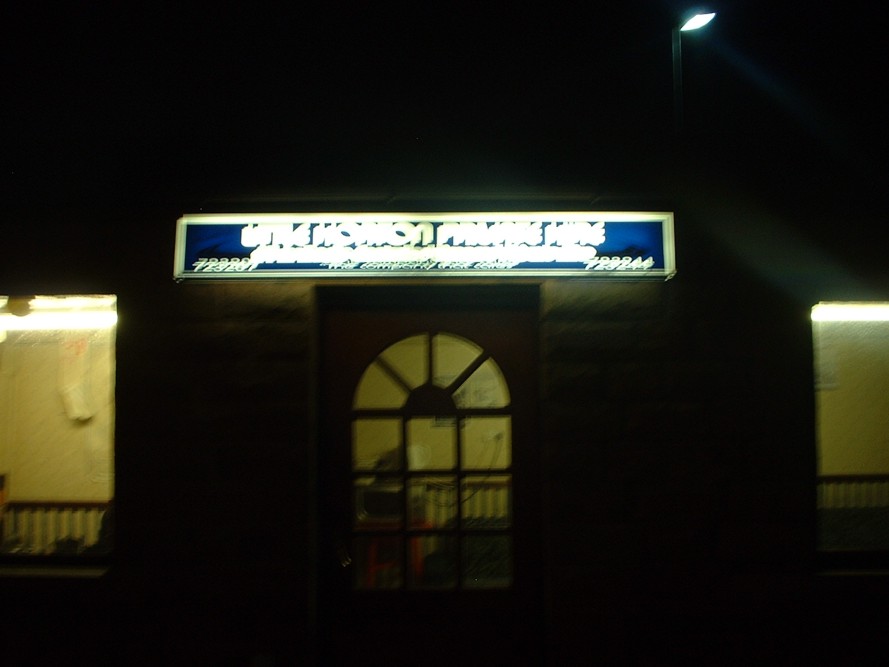
Posted by Stephen Ingham on 21 January 2005 at 22:23Hi all, I recently did some light boxes and went down at night to take a snap of the boxes lit up, you can see the results…………..
I don’t claim to be any type of photographer, fuji digital camera, point and shoot!!!!!!!! 🙄
Any advice on how to overcome this blur effect??
cheers
stephen
Attachments:
 Rodney Gold replied 20 years, 11 months ago 9 Members · 15 Replies
 -
15 Replies
-

I had exactly that problem recently. There is a post somewhere on here about it. I think the post is called something like “Digital camera help” or summink. Anyway, have a search, because I was given some good tips on how to get a decent night shot. A tripod is a good starting point to keep the camera steady.
-

1. dont touch alcohol before taking the shot
2. take it in daylight
3. Get david bailey in
4. turn of the sign
5. dont take me seriously
Peter 😀 -

hi chaps, i think that one of the probs i have is that when i turn the flash off the camera is very sensative…… hense the blur, a tripod is a good idea i’m sure, have to give it a go.
cheers
stephen -
Same here. When I turn my flash off the camera automatically goes to a time exposure of about half a second which causes blur and overexposure. Try a tripod and also look in the manual for the camera and see if you can turn down the exposure and/or white point. I did this and had some success but my camera is just not quite good enough for night time pics.
-
You can try to take a photo by this simple method. Stand far enough back to compose the picture. Sit on the floor and rest your elbows on your knees thus forming a sort of tripod. If you can lean against a wall as well even better. Line up your photo ready to take, make sure you are as still as possible, and now don’t laugh as the next bit is very important, HOLD YOUR BREATH! This makes sure that you are as still as possible. When you take the picture GENTLY SQUEEZE THE BUTTON……..Do not STAB the button as this will also give you camera shake. Hold this position for at least 2 seconds while the shutter operates as it will be a lot slower than with the flash setup.
This picture was taken using the above method.
If you do this on a busy road USE A BIT OF COMMON SENSE 😮 :lol1: :lol1:
ARGGGGGGG There is a ruddy 23 bus coming??????????? (-)
Attachments:

-
The 23 bus doesn’t go through Swansea! 😉
Thanks for the tip Mike, I’ll give that a go as I never did solve the night pic problem I had.
-

:lol1: Oh Mike how I would love to see you taking a night time pic after that description :lol1:
-
although an excellent tip, it must be a funny sight!!
cheers, i’ll give it a go
stephen
-

What Mike failed to tell you was that the paramedics had to be called in to resuscitate him after he’d held his breath too long
-
that bus sitting on top of him probably didn’t help!!
stephen
-
Of course I could have used the tripod in the van but what the heck! 😛
:lol1:
-
I know!
Its like trying to whack in a nail with a spanner cos your too darn lazy to get down the ladder and get the hammer outta the tool box
-
 quote johnalphasign:Its like trying to whack in a nail with a spanner cos your too darn lazy to get down the ladder and get the hammer outta the tool box
Glad I’m not the only one that does that then! 😳
-

what a laugh 😀
Use a tripod and use the self timer on the camera so that you don’t touch the camera and cause shake. Its cheaper than a remote release 😮
If you can’t do either of these take oxygen and mask.
Take a mat and a dog, put down a tin and maybe you could make a few quid between photo attempts, even better if you have some music 😀 😀 -
Hopefully the camera has some settings.
Most of the fujis do.
Heres what to do , change the cameras ISO to the highest. This makes the sensor much more sensitive to light. 2 things control the shot , the shutter speed and the aperture – you want as high a shutter speed as possible , so go into AV mode , if the camera has it and set the aperture to as low as you can. By low I mean numerically low , like 2.8 , 3.5 or 4 , not 8,11,16 etc. Take thre shot with mikes advice in mind.
Portrait mode might work too depending on what it does. It normally sets a low aperture cos when you shoot with the lens wide open (small numerical aperture , IE the iris in the lens is not closing to limit light , the bigger the number the smaller the opening) it makes only what you focus on sharp and the background blurry – so the face you shoot “pops”
At any rate , the idea is to get the shutter speed up high.
If that doesnt work , then a cheap tripod is ideal
DO NOT USE night shot mode!!!
If you have a zoom on the camera , its better to come closer and use the wider angle part of it than the telephoto part , IE try not to zoom right in as normally the wider angle settings will allow more light – the more light you have , the faster the shutter speed you can use and stop the blur.

Log in to reply.