• Corel Draw

    Posted by Deleted User on 5 March 2003 at 18:37

    Hi all

    how do I convert a corel draw file to something which I can import into Signlab? I know, easy to some but not to me!

    Its a file sent to me by a new client, would be good to be able to use it!!

    many thanks

    Deleted User replied 22 years, 9 months ago 3 Members · 3 Replies
  • 3 Replies
  • Mike Brown

    Member
    5 March 2003 at 22:18

    …sometimes Stuart – you can simply open both packages and the ‘copy’ the item to clipboard whilst the Corel window is selected and then ‘paste’ from the clipboard once the Signlab window is selected…sometimes it works – it depends how complex the image is….

    more soon

    mikethesign

  • Steve Broughton

    Member
    6 March 2003 at 08:28

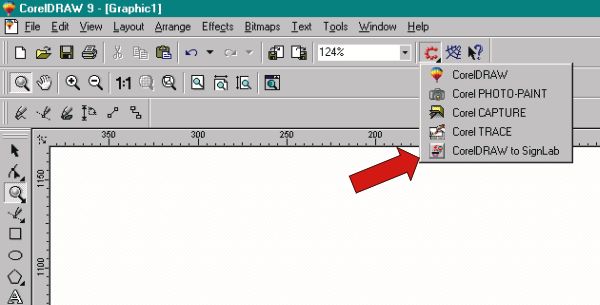
    Stuart was Corel on your computer before you installed Signlab, the reason I ask is that if corel is installed after Signlab, then it adds an application launcher in corel which will export direct from Corel to Signlab, no mucking about exporting N stuff, its from the application launcher on the standard toolbar in Corel.


    Attachments:

  • Deleted User

    Deleted User
    6 March 2003 at 11:41

    Hi guys and many many thanks for your time and help on this, I do not have corel and this was the biggest headache.

    Phil, aka chalkie has kindly sorted the file for me, very much appreciated.

    It never ceases to amaze me how helpful everyone on this site is and all for no personal gain.

    I am very happy to be a member of this wonderful site and hope it remains as good!!

Log in to reply.